- August 28, 2025
- Mins Read

🚨 V5 is now released! 🚨
Atributika is a Swift library that provides a simple way to build NSAttributedString from HTML-like text, by identifying and styling tags, links, phone numbers, hashtags etc.
A standalone AtributikaViews library offers UILabel/UITextView drop-in replacements capable of displaying highlightable and clickable links, with rich customization, and proper accessibility support.
Intro
While NSAttributedString is undoubtedly powerful, it’s also a low-level API that needs a considerable amount of setup work. If your string is a template and the actual content is only known at runtime, this becomes complicated. When dealing with localizations, constructing NSAttributedString isn’t straightforward either.
But wait, Atributika comes to your rescue!
                                                let b = Attrs().font(.boldSystemFont(ofSize: 20)).foregroundColor(.red)
label.attributedText = “Hello <b>World</b>!!!”.style(tags: [“b”: b]).attributedString

Indeed, that’s much simpler. Atributika is easy-to-use, declarative, flexible, and handles the rough edges for you.
Features
Atributika
- NSAttributedString builder.
- Detects and styles HTML-like tags using a custom high-speed parser.
- Detects and styles hashtags and mentions (i.e., #something and @someone).
- Identifies and styles links and phone numbers.
- Detects and styles regexes and NSDataDetector patterns.
- Styles the entire string or just specified ranges.
- Allows all the above to be chained together to parse complex strings!
- Provides a clean and expressive API to construct styles.
- Offers a separate set of detection utilities for standalone use.
- Compatible with iOS, tvOS, watchOS, and macOS.
AtributikaViews
- Custom views with highlightable and clickable links.
- Custom text styles for
normal/highlighted/disabledstates. - Supports custom highlighting.
V5
V5 is a major rewrite of the project, executed in early 2023. It’s not fully compatible with the previous version and requires some manual migration. The introduction of breaking changes was necessary for the project’s further evolution.
Here’s what’s new:
NSAttributedString Building
- Completely rewritten HTML parser, which fixed a multitude of bugs and improved handling of edge cases.
- More generic and robust text transforming and attribute fine-tuning APIs.
AttributedLabel / AttributedTextView
- Moved to a standalone library, independent of Atributika.
- Offers proper accessibility support.
- Improved performance and touch handling.
- AttributedLabel is based on UILabel (lightweight, with vertically-centered text).
- AttributedTextView is based on UITextView (supports scrolling and text selection, with text aligned to the top of the frame).
New examples have been added to the Demo application, including:
- Basic web browser powered by AttributedTextView
- SwiftUI integration
- Highlightable links for Markdown documents
Examples
Detect and style tags, provide base style for the rest of string, don’t forget abouts special html symbols
let redColor = UIColor(red:(0xD0 / 255.0), green: (0x02 / 255.0), blue:(0x1B / 255.0), alpha:1.0)
let a = Attrs().foregroundColor(redColor)
let font = UIFont(name: “AvenirNext-Regular”, size: 24)!
let grayColor = UIColor(white: 0x66 / 255.0, alpha: 1)
let base = Attrs().font(font).foregroundColor(grayColor)
let str = “<a><a></a>tributik<a></a></a>”
.style(tags: [“a”: a])
.styleBase(base)
.attributedString

Detect and style hashtags and mentions
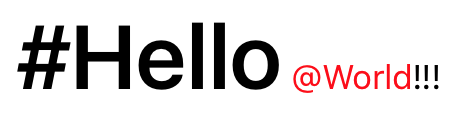
                                                let str = “#Hello @World!!!”

.styleHashtags(Attrs().font(.boldSystemFont(ofSize: 45)))

.styleMentions(Attrs().foregroundColor(.red))

.attributedString
Detect and style links
                                                let str = “Check this website http://google.com”

.styleLinks(Attrs().foregroundColor(.blue))

.attributedString

Detect and style phone numbers
                                                let str = “Call me (888)555-5512”

.stylePhoneNumbers(Attrs().foregroundColor(.red))

.attributedString

Uber String
                                                let links = Attrs().foregroundColor(.blue)

let phoneNumbers = Attrs().backgroundColor(.yellow)

let mentions = Attrs().font(.italicSystemFont(ofSize: 12)).foregroundColor(.black)

let b = Attrs().font(.boldSystemFont(ofSize: 12))

let u = Attrs().underlineStyle(.single)
let base = Attrs().font(.systemFont(ofSize: 12)).foregroundColor(.gray)
let str = “@all I found <u>really</u> nice framework to manage attributed strings. It is called <b>Atributika</b>. Call me if you want to know more (123)456-7890 #swift #nsattributedstring https://github.com/psharanda/Atributika”

.style(tags: [“u”: u, “b”: b])

.styleMentions(mentions)

.styleHashtags(links)

.styleLinks(links)

.stylePhoneNumbers(phoneNumbers)

.styleBase(base)

.attributedString

AttributedLabel
                                                let tweetLabel = AttributedLabel()
tweetLabel.numberOfLines = 0

tweetLabel.highlightedLinkAttributes = Attrs().foregroundColor(.red).attributes
let baseLinkAttrs = Attrs().foregroundColor(.blue)
let a = TagTuner {

Attrs(baseLinkAttrs).akaLink($0.tag.attributes[“href”] ?? “”)

}
let hashtag = DetectionTuner {

Attrs(baseLinkAttrs).akaLink(“https://twitter.com/hashtag/\($0.text.replacingOccurrences(of: “#”, with: “”))”)

}
let mention = DetectionTuner {

Attrs(baseLinkAttrs).akaLink(“https://twitter.com/\($0.text.replacingOccurrences(of: “@”, with: “”))”)

}
let link = DetectionTuner {

Attrs(baseLinkAttrs).akaLink($0.text)

}
let tweet = “@all I found <u>really</u> nice framework to manage attributed strings. It is called <b>Atributika</b>. Call me if you want to know more (123)456-7890 #swift #nsattributedstring https://github.com/psharanda/Atributika”
tweetLabel.attributedText = tweet

.style(tags: [“a”: a])

.styleHashtags(hashtag)

.styleMentions(mention)

.styleLinks(link)

.attributedString
tweetLabel.onLinkTouchUpInside = { _, val in

if let linkStr = val as? String {

if let url = URL(string: linkStr) {

UIApplication.shared.openURL(url)

}

}

}
view.addSubview(tweetLabel)

Requirements
Current version is compatible with:
- Swift 5.0+
- iOS 11.0 or later
- tvOS 11.0 or later
- watchOS 4.0 or later
- macOS 10.13 or later
Note: AttributedLabel / AttributedTextView are available only on iOS
Why dose Atributika have one ‘t’ in its name?
Because in Belarusian/Russian we have one letter ‘t’ (атрыбутыка/атрибутика). So basically it is transcription, not a real word.
Integration
Swift Package Manager
Add dependency to Package.swift file.
                                                dependencies: [

.package(url: “https://github.com/psharanda/Atributika.git”, .upToNextMajor(from: “5.0.0”))

]
Carthage
Add github "psharanda/Atributika" to your Cartfile
CocoaPods
Atributika is available through CocoaPods. To install it, simply add the following line to your Podfile:
                                                pod “Atributika”

pod “AtributikaViews”
Manual
- Add Atributika to you project as a submodule using
git submodule add https://github.com/psharanda/Atributika.git - Open the
Atributikafolder & dragAtributika.xcodeprojinto your project tree - Add
Atributika.frameworkto your target’sLink Binary with LibrariesBuild Phase - Import Atributika with
import Atributikaand you’re ready to go
GitHub
#hashtag #ios #swift #tags #uilabel #uitextview
YOU MIGHT ALSO LIKE...

- August 27, 2025
- SwiftUI
This package provides you with an easy way to show tooltips over any SwiftUI view, since Apple does not provide ...
- August 27, 2025
- SwiftUI
- Uncategorized
SimpleToast is a simple, lightweight, flexible and easy to use library to show toasts / popup notifications inside iOS or ...
- August 27, 2025
- SwiftUI
Create Toast Views with Minimal Effort in SwiftUI Using SSToastMessage. SSToastMessage enables you to effortlessly add toast notifications, alerts, and ...

- August 27, 2025
- Mins Read
- August 27, 2025
- Mins Read
- August 27, 2025
- Mins Read
- August 22, 2025
- Mins Read