- August 28, 2025
- Mins Read

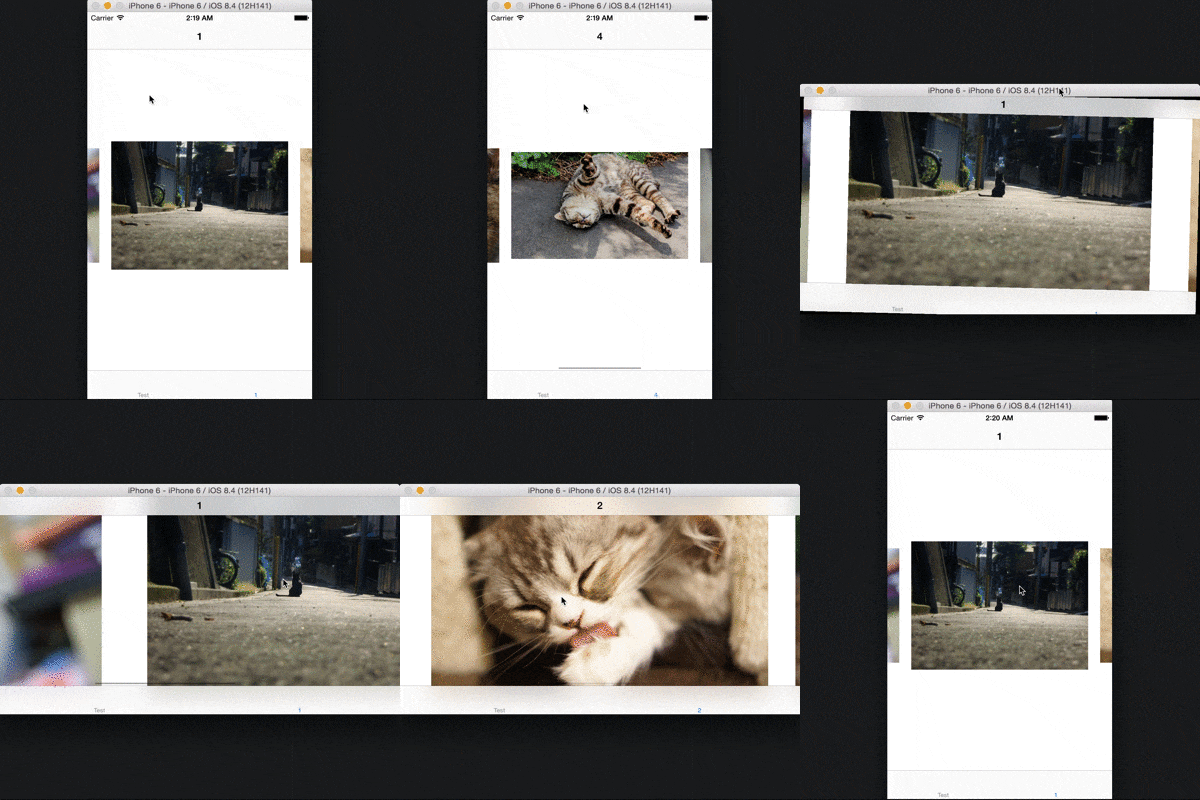
Infinite paging, Smart auto layout, Interface of similar to UIKit.
Appetize’s Demo
Requirements
- Swift 4.2
- iOS 8.0 or later
How to Install PagingView
CocoaPods
Add the following to your Podfile:
pod “PagingView”
Carthage
Add the following to your Cartfile:
github “KyoheiG3/PagingView”
Usage
PagingView Variable
weak var dataSource: PagingViewDataSource?
- DataSource of
PagingView. Same asdataSourceofUICollectionView.
var pagingMargin: UInt
- Margin between the content.
- Default is
0.
var pagingInset: UInt
- Inset of content relative to size of
PagingView. - Value of two times than of
pagingInsetto set for the left and right ofcontentInset. - Default is
0.
var infinite: Bool
- Infinite looping enabled flag.
- Default is
true.
PagingView Function
func dequeueReusableCellWithReuseIdentifier(identifier: String) -> PagingView.PagingViewCell
- Used by the
delegateto acquire an already allocated cell, in lieu of allocating a new one.
func registerNib(nib: UINib?, forCellWithReuseIdentifier identifier: String)
- If a nib is registered, it must contain exactly 1 top level object which is a
PagingViewCell.
func registerClass<T : PagingView.PagingViewCell>(viewClass: T.Type, forCellWithReuseIdentifier identifier: String)
- If a class is registered, it will be instantiated via
init(frame: CGRect).
func reloadData()
- Requery the
dataSourceanddelegateas necessary.
func invalidateLayout()
- Relayout as necessary.
                                                func numberOfSections() -> Int

func numberOfItemsInSection(section: Int) -> Int
- Information about the current state of the
PagingView.
func scrollToPosition(position: PagingView.PagingView.Position, indexPath: IndexPath? = default, animated: Bool = default)
- To scroll at
Position. - Cell configure is performed at
IndexPath.
func configureAtPosition(position: PagingView.PagingView.Position, toIndexPath: IndexPath? = default)
- Configure cell of
Position. - IndexPath of cell in the center if indexPath is
nil.
PagingViewDataSource Function
func pagingView(pagingView: PagingView.PagingView, numberOfItemsInSection section: Int) -> Int
- Paging count number of paging item in section.
func pagingView(pagingView: PagingView.PagingView, cellForItemAtIndexPath indexPath: IndexPath) -> PagingView.PagingViewCell
- Implementers should always try to reuse cells by setting each cell’s reuseIdentifier and querying for available reusable cells with
dequeueReusableCellWithReuseIdentifier:.
optional func numberOfSectionsInPagingView(pagingView: PagingView.PagingView) -> Int
- Paging count number of paging item section in
PagingView. - Default return value is
1.
optional func indexPathOfStartingInPagingView(pagingView: PagingView.PagingView) -> IndexPath?
- IndexPath when
pagingView:cellForItemAtIndexPath:is first called - Default return value is
0 - 0ofIndexPathinstance.
PagingViewDelegate Function
                                                optional func pagingView(pagingView: PagingView.PagingView, willDisplayCell cell: PagingView.PagingViewCell, forItemAtIndexPath indexPath: IndexPath)

optional func pagingView(pagingView: PagingView.PagingView, didEndDisplayingCell cell: PagingView.PagingViewCell, forItemAtIndexPath indexPath: IndexPath)
- Called at the display and end-display of.
PagingViewCell Function
func prepareForReuse()
- if the cell is reusable (has a reuse identifier), this is called just before the cell is returned from the paging view method
dequeueReusableCellWithReuseIdentifier:.
GitHub
#autolayout #indexpath #ios #swift #uikit
YOU MIGHT ALSO LIKE...
- August 27, 2025
- SwiftUI
This package provides you with an easy way to show tooltips over any SwiftUI view, since Apple does not provide ...
- August 27, 2025
- SwiftUI
- Uncategorized
SimpleToast is a simple, lightweight, flexible and easy to use library to show toasts / popup notifications inside iOS or ...
- August 27, 2025
- SwiftUI
Create Toast Views with Minimal Effort in SwiftUI Using SSToastMessage. SSToastMessage enables you to effortlessly add toast notifications, alerts, and ...

- August 27, 2025
- Mins Read
- August 27, 2025
- Mins Read
- August 27, 2025
- Mins Read
- August 22, 2025
- Mins Read